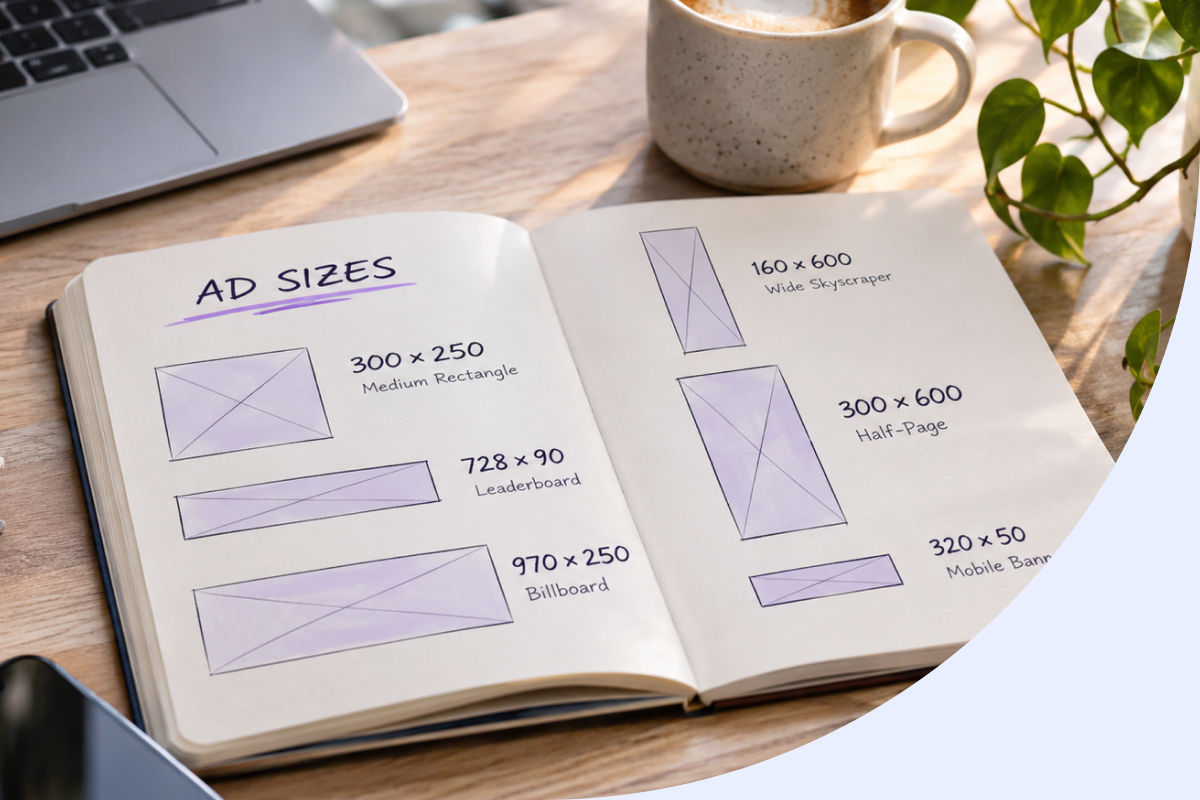
ad sizes
Choosing ad sizes is a publisher decision, not just a matter of matching an advertiser’s artwork. The right slots should suit your page layout, device mix and available demand without making content harder to read.
Key Takeaways
- Ad size choices should follow your page layout, device mix and demand patterns rather than the creative files advertisers happen to send.
- Standard display dimensions such as 300×250 and 728×90 remain useful because they attract broad programmatic demand across screens.
- Larger formats can lift viewability, but they only pay off when they fit the page without pushing content below the fold.
- Auditing which sizes actually win auctions on your inventory gives you a practical basis for pruning slots that underperform.
- Testing one layout change at a time helps you separate the effect of a new ad size from other traffic shifts.
Start with a small set of recognised formats, then assess how each one contributes to your broader publisher monetization strategy in its actual position. A standard dimension can make inventory easier to trade, but it does not guarantee strong revenue or a good user experience.
Ad sizes: what the dimensions mean across digital and print
An ad size describes the width and height of a display slot or creative, usually in pixels for digital placements. For publishers, the slot is the space available on the page; an advertiser’s creative specification describes the artwork that can fit that space.
IAB standard dimensions give publishers and buyers a shared starting point for trading display inventory. They do not require every site to use every format: the useful set depends on your layouts, devices and demand.
| Channel or placement | Common dimensions or formats | Publisher consideration |
|---|---|---|
| IAB display | 300×250 medium rectangle; 728×90 leaderboard; 160×600 wide skyscraper; 300×600 half-page; 970×250 billboard; 320×50 mobile banner | Use dimensions that fit the available page area and device layout. |
| Google display | 300×250 medium rectangle; 336×280 large rectangle; 728×90 leaderboard; 300×600 half-page; 320×100 large mobile banner | Creative eligibility and available inventory depend on the placement and current platform specifications. |
| Meta feed, Stories and Reels | Feed: 1080×1080 (1:1) or 1080×1350 (4:5); Stories and Reels: 1080×1920 (9:16) | These are creative dimensions for social placements, not automatic specifications for a publisher’s display slots. |
| Full-page, half-page, quarter-page and column-based newspaper formats | Trim and bleed dimensions are set by each publication, so confirm its production specifications. |
Google’s commonly used display formats and Meta’s placement dimensions serve different buying environments. Platform specifications can change, so treat the table as a reference, not a substitute for current requirements.
Choose slots by balancing revenue and reader experience
A larger or more widely used format may be eligible for more campaigns, but its dimensions alone do not determine CPM, fill rate or ad viewability. Position, screen size, demand, page density and loading behaviour all affect the result.
A prominent unit may draw attention, yet disrupt reading or contribute to poor page loading if it takes up too much space or delays content. Consider the slot in context, including its effect on Core Web Vitals, rather than judging it by its potential reach alone.
- Map current placements and device breakpoints.
- Check which standard formats fit each location and match actual demand.
- Prioritise a small number of relevant formats for your audience and layout.
- Test one change at a time, keeping the rest of the setup as consistent as possible.
For example, a 320×50 mobile banner may fit neatly between content sections, while a larger unit in the same position could interrupt the reading flow. Assess the banner’s existing viewability and revenue alongside its location before deciding whether to change it.
Where the question is which format to use, our Ad Experience Hub covers high-impact ad formats and advertising experiences. For implementation details, use the relevant setup documentation rather than treating a format decision as a technical specification.
Measure existing ad slots before adding or removing sizes
Before changing a layout, create an inventory of each slot: its dimensions, page position, device, eligible ad requests and mapped formats. This gives you a baseline and helps flag unsupported sizes, duplicate mappings or formats that do not fit the placement.
Then compare viewability, CPM, fill rate and revenue per page or session over a consistent period to support better ad revenue optimization decisions. Segment results by device and placement where possible, so a strong desktop slot does not obscure a weaker mobile position.
Audit each placement before testing a change
- Record the slot dimensions, location and device breakpoint.
- Check eligible requests and the size mapping applied to each placement.
- Identify formats that are unsupported, duplicated or poorly matched to the available space.
- Set a baseline for viewability, CPM, fill rate and revenue per page or session.
- Change one element at a time and compare like-for-like periods and placements.
A change in revenue or viewability does not prove that a size caused it, so keep tests controlled before making broader programmatic revenue optimization decisions. Traffic mix, seasonality or demand may have shifted at the same time, so keep the comparison controlled and note other changes to the setup.
Insights Hub acts as an ad revenue analytics platform, while Ad Manager Hub provides the header bidding wrapper. Use the relevant current knowledge-base guidance for setup and size mapping rather than relying on an old configuration or rebuilding technical steps from a report.
Check platform, policy and consent requirements
Google display and Meta specifications set requirements for eligible advertising creative, not a mandate for publishers to offer every corresponding slot. Google’s current display specifications and the Meta Ads Guide should be checked before using a static reference, as accepted dimensions and placement rules can change.
Keep the distinction clear when reviewing inventory: a platform may accept a particular creative shape, while your own page layout determines which slots you choose to support. For print, confirm trim and bleed requirements directly with the publication, since production specifications are not interchangeable with digital placement rules.
Compliance checks before changing inventory
- Verify current creative dimensions and placement requirements in Google’s display documentation and the Meta Ads Guide.
- Review the Coalition for Better Ads standards when assessing ad experiences and their effect on visitors.
- Check that your consent management platform (CMP) reflects applicable consent requirements and is configured for your advertising setup.
- Follow current ads.txt and CMP guidance for your monetisation partners, rather than inferring compliance from a slot’s dimensions.
- Recheck platform and consent documentation when policies or your advertising setup change.
These checks address different responsibilities: platform rules concern creative eligibility, while publisher-side choices and consent handling concern how inventory is presented and monetised. Neither a familiar dimension nor a compliant creative alone confirms that the full setup meets your obligations.
Before making a layout change live, confirm the relevant platform, consent and implementation requirements for your setup. The FAQ that follows addresses common questions about choosing and using advertising formats.
Frequently Asked Questions
What are the maximum image sizes for Google Ads in 2026?
Google Ads does not have one maximum image size for every ad format and placement. Accepted dimensions, file limits and creative requirements depend on the campaign type, so check Google’s current specifications before preparing artwork. Publisher slot dimensions determine the space available on your page, not the full set of advertiser upload limits.
A common desktop banner size is 728 × 90 pixels, known as a leaderboard. Other widely used display formats include the 300 × 250 medium rectangle and 160 × 600 wide skyscraper. Choose a size that fits your page layout and check its performance in the placement where it will appear.
What size is a 1/4 page ad?
A quarter-page print ad has no single standard size because dimensions depend on the publication and its page layout. Ask the publisher for its exact trim and bleed specifications before supplying artwork. Digital display ads use pixel dimensions and are not defined by print fractions such as quarter-page.
What size is a TV ad?
A TV ad is usually specified by its duration and video format, rather than by the pixel dimensions used for display ad sizes. Requirements vary by broadcaster, channel and delivery method, so confirm the current technical specifications with the broadcaster or platform before submitting a video.
How big is a full-page ad?
A full-page print ad fills the publication’s defined page area, but its exact dimensions vary by publication and paper format. Confirm the page size, trim and bleed requirements with the publication before designing the ad. A full-page print format is different from a digital display slot measured in pixels.
Does choosing a larger ad size mean publishers will earn more?
A larger ad size does not guarantee higher revenue for publishers. Earnings also depend on demand, placement, device, viewability and fill rate, while a large unit can take up reading space or affect page loading. Compare revenue and user experience for each placement before changing its dimensions.